 FDIC-Insured – Backed by the full faith and credit of the U.S. Government

Mobile Banking
Money management at your fingertips.
View up-to-date account balance and activity
Transfer money between Security Bank accounts
Send money to friends and family with Zelle
Make secure bill payments
Free for consumer accounts
$15 for unlimited payments for business accounts
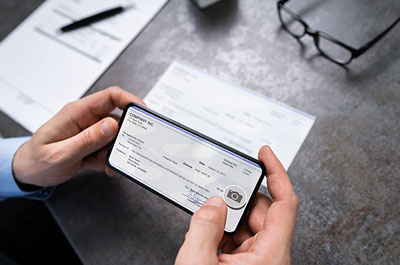
Deposit checks with Mobile Deposit
Available for consumer and Small Business Checking accounts
For multiple business check deposits, get the job done faster with Remote Deposit Capture
Download our free SB Mobile app today.


Getting Started
To access Security Bank's Mobile Banking, you need to be enrolled in Online Banking. Enroll in Online Banking or stop by our branch at 10727 E. 51st Street in Tulsa.
Once enrolled in Online Banking, download the SB Mobile app from Google Play or the App Store. Open the SB Mobile app to complete setup. The first time you access the app, you will be presented with some additional authentication questions to confirm your identity.
Mobile banking is available for personal and business accounts.
The account has to be open for at least 30 days.
The account cannot be overdrawn more than five (5) days within a 30-day look back period.
Mobile deposit is available for personal accounts only at this time.
Mobile Deposit limitations include:
$5,000 daily deposit limit
$5,000 single item deposit limit
$40,000 rolling 20 business day deposit limit
Daily deposit limit of 5 items
Rolling 20 business day limit of 10 deposits
The account cannot be overdrawn more than five (5) days within a 30-day look back period.
Ineligible deposit items defined in the User Agreement include:
Checks or items payable to any person or entity other than you.
Checks or items containing obvious alteration to any of the fields on the front of the check or item, or which you know or suspect, or should know or suspect, are fraudulent or otherwise not authorized by the owner of the account on which the check or item is drawn.
Checks or items previously converted to a substitute check.
Checks previously deposited and returned unpaid (charge-back items).
Checks or items drawn on a financial institution located outside the United States.
Checks or items that are remotely created checks.
Checks or items not payable in United States currency.
Checks or items dated more than 6 months prior to the date of deposit.
A single check in an amount over the dollar limit.
Checks or items prohibited by Security Bank's current procedures relating to the services or which are otherwise not acceptable under the terms of your Security Bank account.
Mobile Banking is free for personal and business customers* with an online banking account. Talk to your cellular provider about possible data rates or fees that may incur depending on your phone plan.
*Bill Pay is free for personal accounts. For business accounts, unlimited Bill Pay is $15/mo.
Mobile Banking provides you access to the same accounts available to you in your Online Banking account.
Unlimited Bill Pay is free for personal accounts. For business accounts, unlimited Bill Pay is $15/mo.
Our mobile banking solution uses advanced security features including multifactor authentication, device detection and timeout to safeguard your financial information.
To further protect your accounts, we encourage you not to access personal bank accounts or sensitive personal data on unsecured public Wi-Fi networks. Don't leave your mobile device unattended in a public place and set password-protection for accessing your phone.
User Help
Once you have successfully enrolled and logged into our Online Banking account, you can begin accessing your banking information via the Security Bank mobile app. The first time you access the mobile app, you will be presented with some additional authentication questions to confirm your identity.
Once logged in, you'll see your accounts and balance summary. Click an account to view account activity.
Mobile Deposit is available for personal consumers only at this time. Business owners, Remote Deposit Capture may be a better solution for your check-depositing needs.
To deposit a check, click the "+" icon at bottom center of your app and select "Deposit". Follow the directions.
Click the "+" icon at bottom center of your app and select "Transfer". Follow the directions.
You must have at least one eligible source account and one eligible destination account to support money transfers.
Unlimited Bill Pay is free for personal accounts. For business accounts, unlimited Bill Pay is $15/mo.
Click the "+" icon at bottom center of your app and select "Pay Bill". Select a payee, enter the amount you wish to pay and click "Done" at top right of screen. Review payment, then click "Continue. A screen will pop out asking you to confirm your payment. Click approve to pay.
Within the Mobile Banking app, you will only be able to pay bills to payees already set up in your Online Banking bill pay account. To add or delete payees, you will need to do so in your Online Banking account.
Download our Free Mobile App!


Open a Deposit Account